
What this article covers: Speed: how page speed affects Google and AI search.
It used to be enough for a website to "work". Today it is assessed before any visitor sees it by two strict judges: Google's speed measurement, which affects rankings, and AI assistants (ChatGPT, Claude, Perplexity, Google's AI Overviews), which people increasingly ask instead of running a classic search. Both work quietly — and both can quietly skip your site.
In this article we explain in plain language what those two judges actually measure, which traps sink sites most often, and how to check where you stand.
What Google's speed test actually measures
Google PageSpeed Insights (search for it, enter your address, wait a minute) does not time your page with a stopwatch from start to finish. It measures three things a visitor genuinely feels:
- How quickly the main content appears. Not the logo, not the background — the thing the visitor came for. Google calls it LCP; the visitor calls it "is anything happening at all".
- Whether the page jumps around while loading. When text shifts just as you are about to tap it, Google measures and penalises that, and the visitor is simply annoyed.
- How quickly the page responds to a tap. Frozen menus and delayed buttons count just as much as slow loading.
Why the score is not just a number for technicians
Speed is one of Google's ranking signals — between two comparable pages, the faster one wins. But the effect on people matters more: research has shown for years that every second of waiting costs you a share of visitors, and more on a phone. A slow site therefore loses twice — on Google, and with every visitor who did not wait.
One detail many people miss: it is the mobile score that counts, not the desktop one. Google assesses your page as an average phone on an average network would load it — and that is where the differences really show. Plenty of sites are green on a computer and deep red on a phone.
Tip: Check your site now: PageSpeed Insights, the "Mobile" tab. If the score is below 70, you are losing traffic you have already paid for with ads or earned with content.
The traps that sink sites most often
Across the sites clients send us, the causes almost always come down to the same few traps:
- Oversized images — a photo straight from a phone, uploaded at full size, weighs more than the rest of the page put together.
- Accumulated plugins and scripts — every widget, slider and tracking pixel brings its own piece of code; after a few years there is a truckload.
- Render-blocking elements — the page waits for files it does not need for the first view at all.
- Slow or overcrowded hosting — even an excellent site starts with a penalty on a poor server.
- Fonts and tools from third-party servers — every external connection is another wait you do not control.
The new judge: AI search
More and more people no longer type their question into Google but ask ChatGPT, Claude or Perplexity: "Recommend a joiner in my area", "How much does an online store cost?". The assistant answers with a handful of recommendations — and if your site is not among them, for that user you do not exist. Classic SEO has expanded into what the industry calls GEO: AI search optimisation.
And here is a trap we see surprisingly often: sites unknowingly close the door on AI crawlers. Hosting and security systems mistake them for threats, the robot settings were written for yesterday's web, and content sits in images or files an AI cannot read. The owner never notices — the site works fine for them — while the AI meets a closed door and recommends a competitor.
What AI assistants value in a site
- That they are allowed and able to read it — access for their crawlers is condition number one, and this is where most of the silent blocking happens.
- Clear, concrete content — prices, services, answers to questions. AI cites pages that say things plainly, not pages full of "leading solutions for your success".
- Structured data — machine-readable markup that tells Google and AI what is a price, what is a question and what is an answer.
- Being current and tidy — a working sitemap, no duplicate or dead links, fresh content.
- New conventions for AI — there are also dedicated files through which a site introduces itself to AI search; most sites have never heard of them.
How we do it — with proof
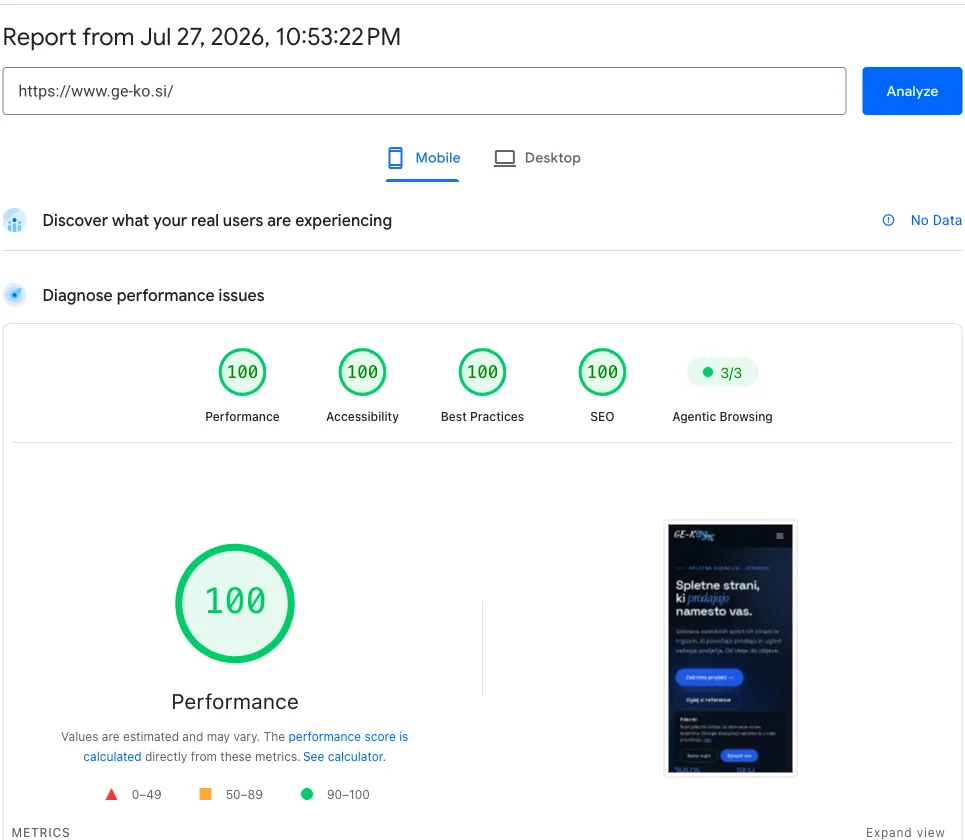
Talking about speed is easy; proving it is harder. So the rules we build into our clients' sites were first applied to our own: ge-ko.si scores 100/100 on Google's measurement for speed, accessibility, best practices and SEO — on both phone and desktop. Verified live, not on paper.
The same goes for AI search: we regularly verify our site's accessibility to all the significant AI crawlers in the server logs, and the content is written so assistants can read, summarise and cite it. The same process — measurements before handover, optimised images, a clean system without bloat and open doors for AI — goes with every site we build or redesign. And with regular maintenance we make sure it stays that way.
Check yourself in three minutes
If any of the three answers is poor, you have a symptom. The cause is almost always technical and not visible to the eye — tools tell you WHAT is wrong, not HOW to fix it without breaking something else. That part is our job.
- Enter your site in PageSpeed Insights and look at the mobile score.
- Ask ChatGPT or Claude: "What do you know about [your company]?" and "Recommend [your service] in [your town]" — are you among the answers?
- Search Google for "site:yourdomain.com" — are the results tidy, current, free of duplicates?
Frequently asked questions
What is a good PageSpeed score?
The green range starts at 90. Between 50 and 89 there is room for improvement; below 50 the site is actively losing visitors. Always look at the mobile score — that is what counts for Google and for most of your traffic.
Can I fix the speed myself?
You can check the symptoms yourself in a minute, but the causes are technical: images, code, server, loading order. Careless changes tend to break something, so leave the review and the fixes to a professional and verify the result with the same public test.
What does it mean for a site to be "optimised for AI"?
That AI search is allowed and able to read it, that it understands what you offer (structured data, clear content), and that it can therefore recommend you in its answers. It also covers newer conventions that most sites do not yet have.
Has AI optimisation replaced classic SEO?
No — it has extended it. A good foundation (speed, structure, content) counts for both; AI search is an additional channel that rewards the same virtues and punishes silent technical blocks.
My site looks good and works. Is that enough?
Appearance is only half the story — Google and AI see code, speed and accessibility, not design. A site can look excellent and still be slow or invisible to AI. So it pays to measure rather than guess.
What does it cost to sort this out on my site?
We carry out a speed and AI accessibility review free of charge when you enquire. Smaller optimisations often fall within regular maintenance (€35 + VAT a month); for older sites the honest answer is sometimes a redesign — and we say so in advance, with no surprises.